




Need one Todoist task to wait for another? Add a dependency between them in your Gantt chart. When the first task slips, the tasks that depend on it move along, so you don’t have to shift every due date by hand. Handy when the copy has to be approved before the design can start, and the approval runs a week late.
This short video shows how it works:
Add a dependency
Open your Todoist project in Ganttify. Each row in the chart is a task from your project, shown as a time block or a due date. Missing a task you want to link? You can add Todoist tasks right from your chart.
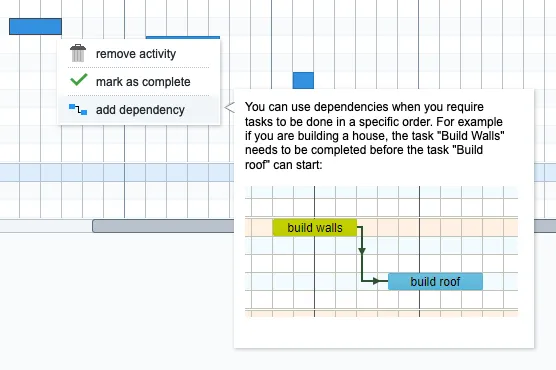
- Right-click the time block or due date of the task that comes first.
- Choose add dependency.
- Click the time block or due date of the task that has to wait. A line now connects the two tasks.
To reschedule, drag a time block or due date left or right in the chart.
Drag a task later and the tasks that depend on it move with it, so none of them starts before it ends. The new dates show up in Todoist on all your devices.
Remove a dependency
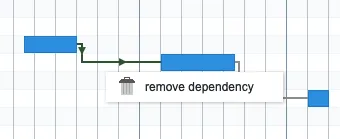
Right-click the line between two tasks and choose remove dependency.
Where you see dependencies
Dependencies live in your Gantt chart, so you won’t see them in Todoist itself, only the dates they set. When a delay pushes your dates back and you want to keep clients outside your Todoist team up to date, you can send them a read-only Gantt chart, so they always see the latest schedule.