



Your freelance project grew into a four-person studio, finance wants last month’s invoice, or a renewal bounced because your card expired? Each of those takes a minute in your account, and your charts stay exactly as they are.
Change your plan
Teams change, and your plan can change with them. Open your account, go to Subscription and choose Change plan, then pick the plan and billing you want and confirm. The new plan applies right away, and the price difference is prorated over your current billing period, so you pay for each plan only for the time you’re on it. Your charts, settings and shared links come with you.
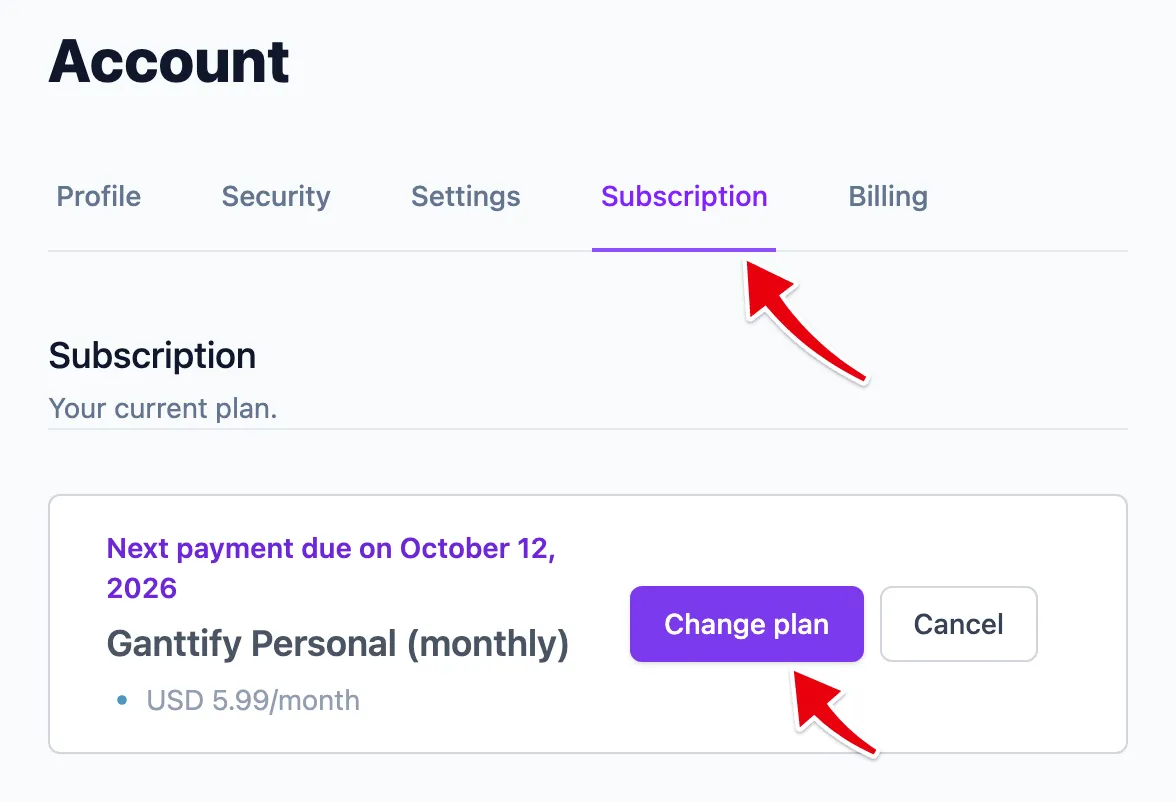
Going from solo to a team is the usual reason to switch. Personal is for one person, Small Team gives you 10 seats and Large Team has no limit, so pick the one that fits the people you plan with and invite them to your team once you’ve switched. Not sure which one fits? Compare the three plans. Paying annually gets you two months free on every plan.
Scaling back works the same way, as long as your team fits the smaller plan. Moving from Large Team to Small Team, bring your team down to 10 seats or fewer first. Moving to Personal, remove your team before you switch. If a colleague should keep the team running, we can hand the billing over to them (see below). And if you’re done with Ganttify for now, cancel your subscription instead: canceling stops the renewal, and you keep full access until the end of the period you already paid for.
Invoices and VAT details
Every payment comes with an invoice, so your bookkeeping or expense report never waits on anyone. Open your account, go to Billing and choose Invoice next to the payment you need, then print it or save it as a PDF. Need your company name, address or VAT number on it? Add them on the invoice itself before you save it.
Invoices are issued by Paddle, the payment provider behind your subscription and the merchant of record.
Keep your payments running
New card from the bank, or moving the subscription to the company card? Go to Billing and choose Update Payment Method. Your next payment goes to the new card, and your plan carries on as it is.
If a renewal doesn’t go through, usually because a card expired or was replaced, you keep working as normal while the payment is retried over the next few days. Updating your card in that time settles it before your work is interrupted.
If every retry fails, your subscription is paused until the payment goes through. Everything you’ve built is kept, so getting back takes a minute: go to Subscription, choose Update payment details and enter a working card, and you pick up where you left off without subscribing again.
A paused subscription is held for 30 days. After that it’s canceled, and from then on it works like canceling on purpose: your account and charts stay for two months, so you can still subscribe again and carry on.
Billing on a team plan
A team plan has one subscription, billed to the team owner, so everyone else on the team can plan without thinking about payments. Plan changes, invoices and card updates all go through the owner, so ask them when you need an invoice. If a payment fails, the whole team is paused together, and everyone is back in together as soon as the owner updates the card.
What we handle for you
A few billing changes go through us rather than your account. Email support@ganttify.com and we’ll take care of them:
- Moving the plan you’re already on between monthly and annual billing.
- Correcting a VAT number on an invoice you’ve already filed. Include the invoice date and the right details, and we’ll sort it out with Paddle.
- A payment that keeps failing while your card is fine. We’ll check what the payment provider reported.
- Handing billing over to a colleague, for example because the team owner is leaving the company.